Cloud Computer For Real Work

The cloud computer that actually lets you work.

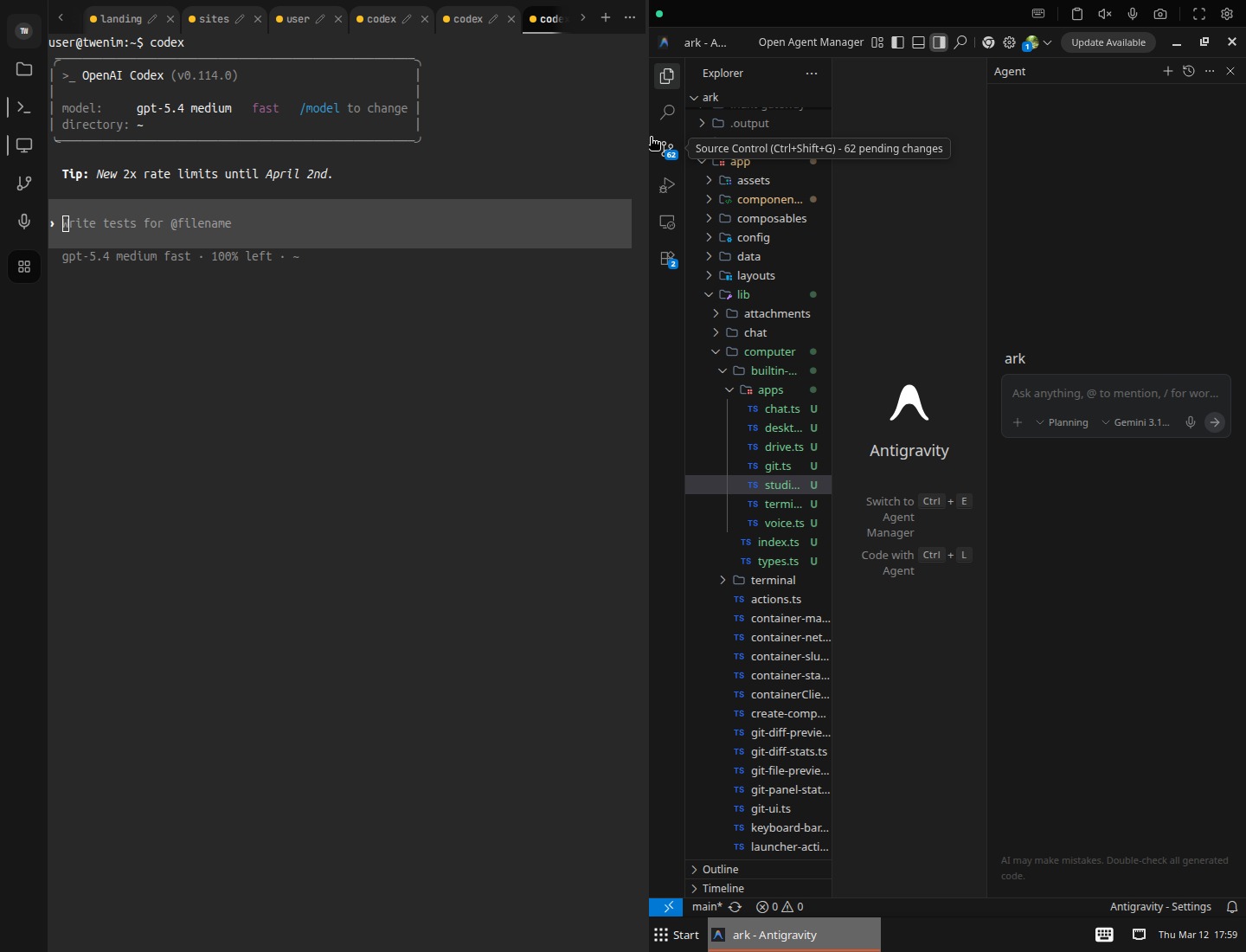
Giz Computer combines desktop, terminal, drive, git, managed apps, mobile control, and external exposure into one persistent machine. Open it anywhere and keep the same working state.

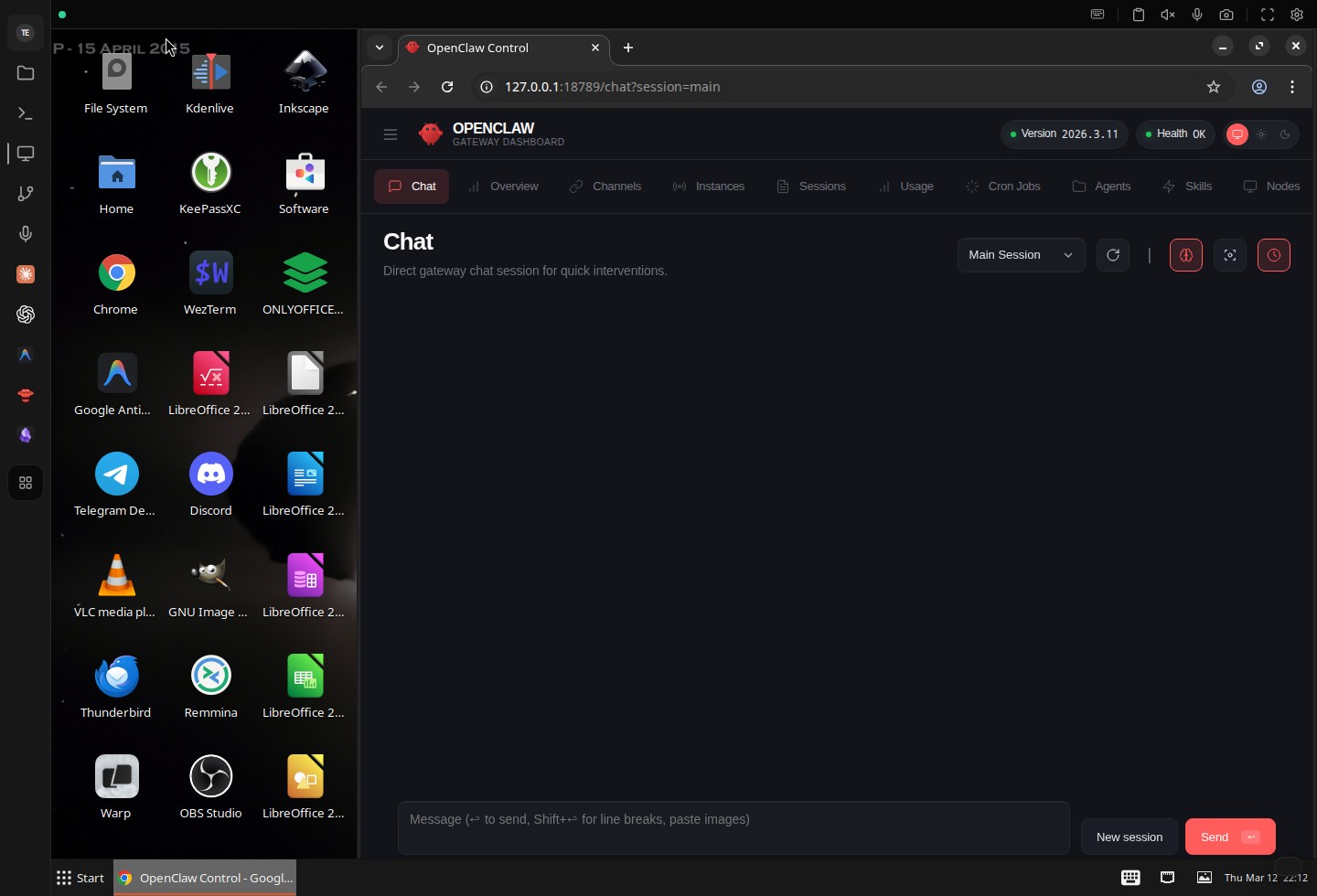
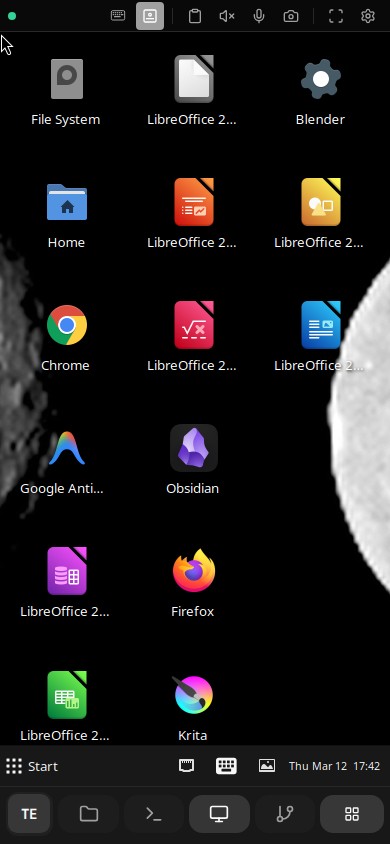
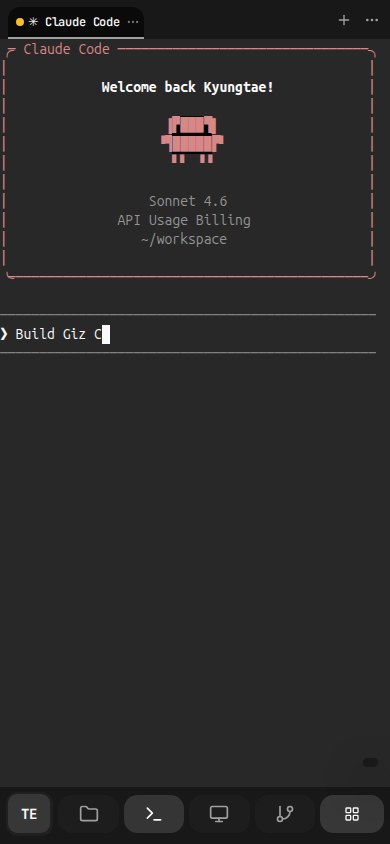
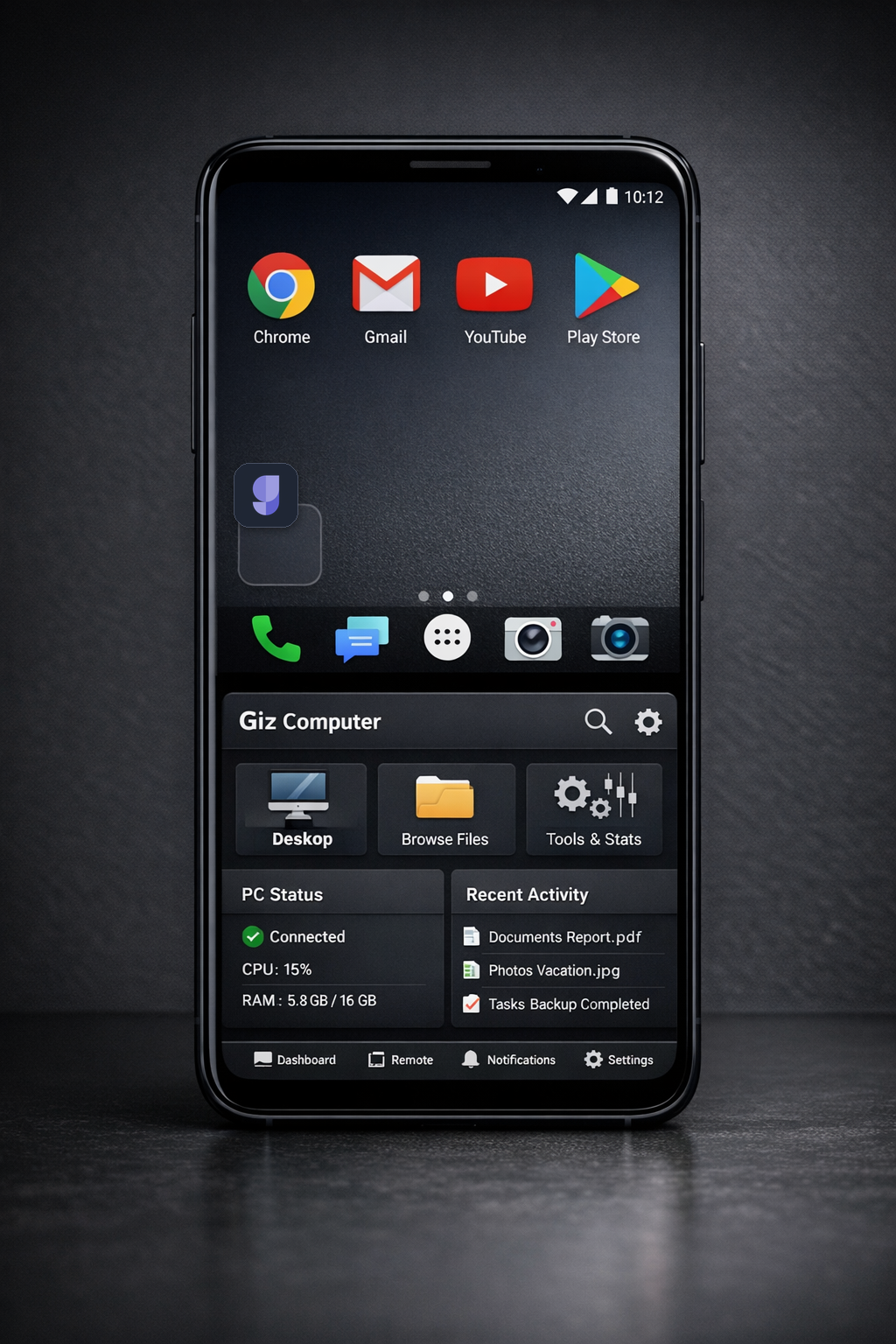
Giz Computer desktop workspaceGiz Computer mobile dashboardGiz Computer mobile desktop
Persistent Linux computer
Desktop, terminal, drive, git, apps
Mobile-ready remote control
Private by default
SurfaceDesktop + Terminal + Drive + Git + Apps + Automations
StatePersistent files, metadata, snapshots, and machine context
Catalog322 installable app IDs in the runtime catalog
AccessPhone, tablet, laptop, installable workspace
NetworkIPv6, sites, ports, custom domains, share links

Proof First

Show the product before asking for belief.

The landing now leads with curated real captures from the product: machine control, desktop access, Drive memory, publish controls, and the runtime catalog itself.

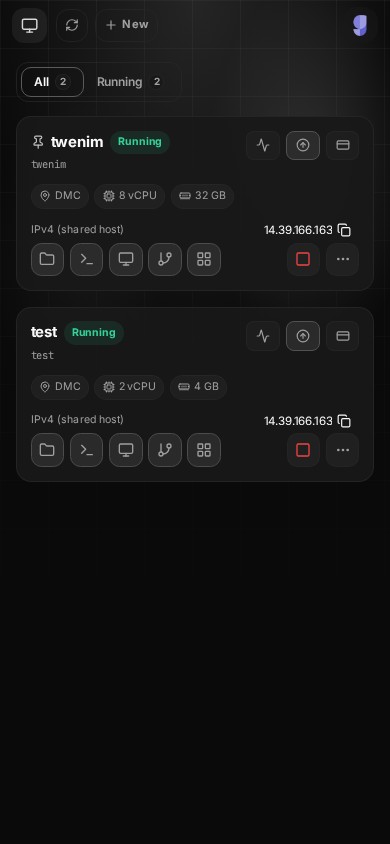
Dashboard

Manage multiple live computers from one mobile view.

Create, start, stop, upgrade, inspect network state, and jump straight into the tool you need.

Manage multiple live computers from one mobile view.

Desktop

Open a real GUI desktop, not just a code sandbox.

Run browser workflows, native windows, and GUI apps inside the same computer your agent and files already use.

Open a real GUI desktop, not just a code sandbox.

Ops

Operate the machine lifecycle from the dashboard, not from infrastructure sidecars.

Running state, specs, storage, events, upgrades, billing, and runtime actions are part of the product surface.

Operate the machine lifecycle from the dashboard, not from infrastructure sidecars.

Git

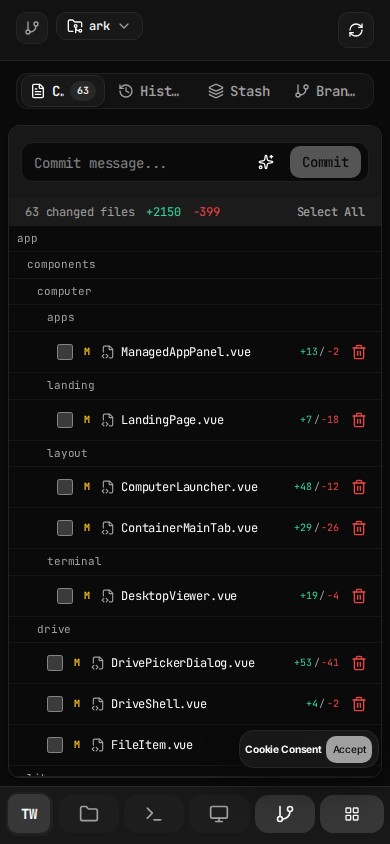
Review changes inside the same computer instead of bouncing between tools.

Git history, staged changes, and diff review live beside the terminal, files, and desktop apps that created them.

Review changes inside the same computer instead of bouncing between tools.

Apps

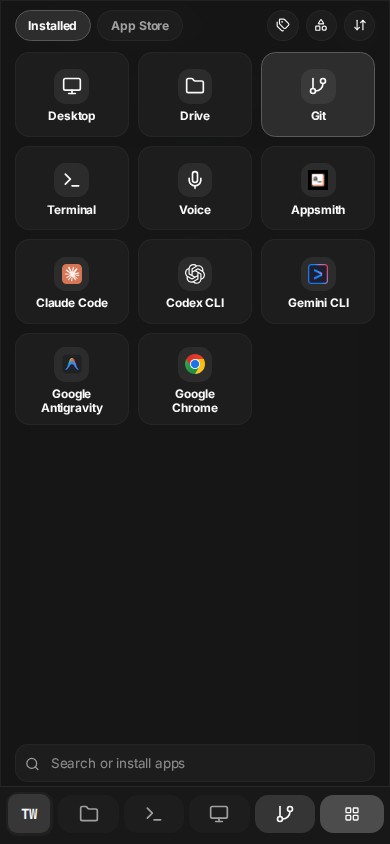
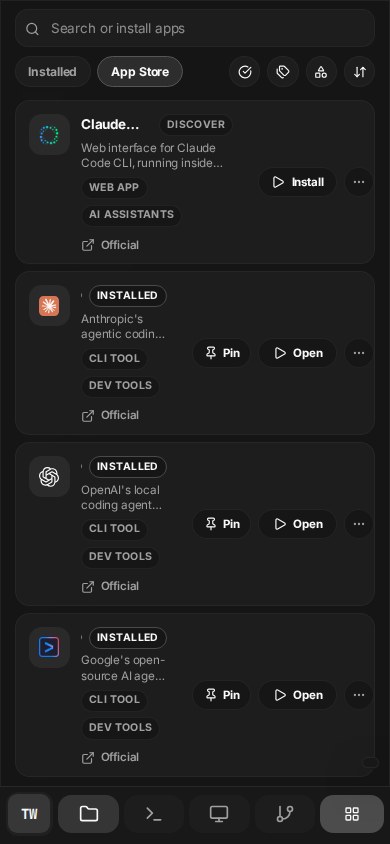
The computer is a launch surface for a large app and runtime catalog.

The managed app catalog already spans 322 installable app IDs, from coding CLIs and browsers to service apps and desktop tooling.

The computer is a launch surface for a large app and runtime catalog.

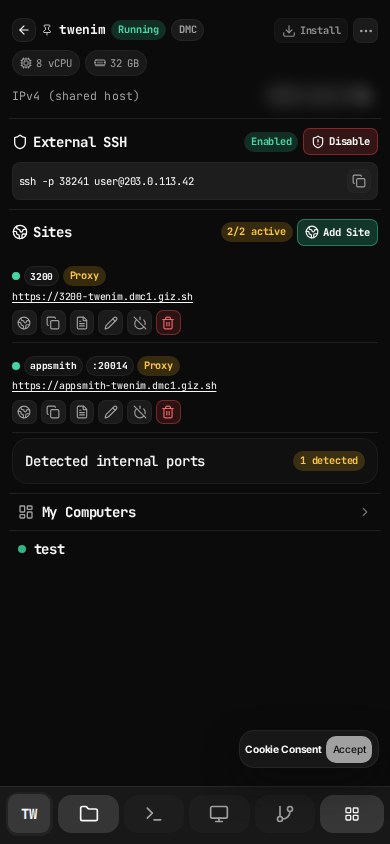
Access

External SSH, active sites, and machine switching live in the same control surface.

The main tab is not a decorative profile menu. It exposes direct SSH state, active published endpoints, per-site controls, and the running computer roster in one place.

External SSH, active sites, and machine switching live in the same control surface.

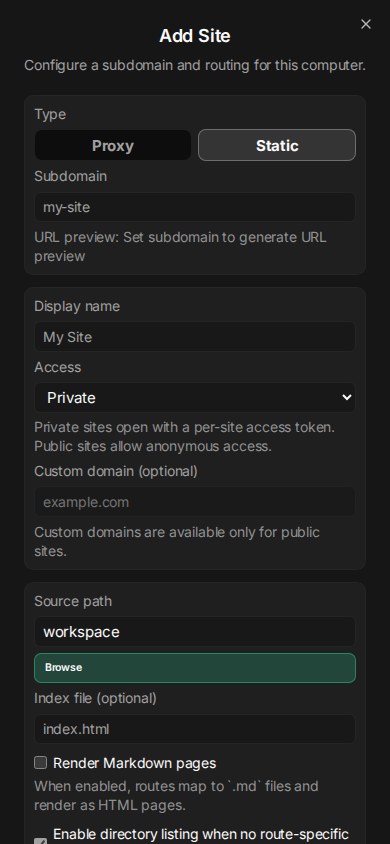
Publish

Publishing is configurable down to access mode, routing type, and custom domain.

Proxy or static site mode, private or public visibility, URL previews, port binding, and custom domain setup are built into the product surface.

Publishing is configurable down to access mode, routing type, and custom domain.

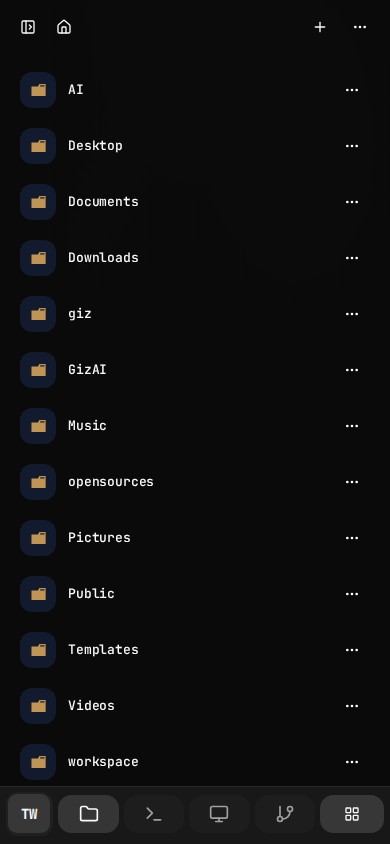
Drive

Drive is the memory plane for the same machine, not a detached storage tab.

Folders, collection scopes, storage state, and the same container-backed file tree stay available beside Computer instead of living in a separate silo.

Drive is the memory plane for the same machine, not a detached storage tab.

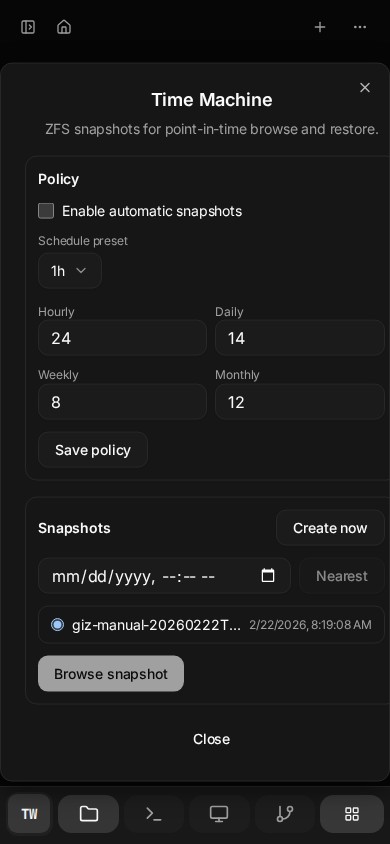
Snapshots

Time Machine makes Drive behave like durable memory, not a fragile folder view.

Snapshot policy, manual snapshots, nearest-point lookup, and restore planning are built into the product surface for the active computer.

Time Machine makes Drive behave like durable memory, not a fragile folder view.

Capability Coverage

This is broader than a browser IDE and deeper than a hosted desktop.

Ark Computer is the execution layer of the platform: isolated machine, persistent storage, desktop and shell surfaces, app runtime controls, and network exposure in one product.

Real Computer Surface

This is a full cloud computer surface, not a single-purpose dev environment.

  • Full remote desktop for GUI workflows
  • Low-friction terminal sessions for shell and coding
  • Panel-based workspace for desktop, drive, git, agent, and apps

One Shared Working State

Files, apps, agent context, and desktop state stay aligned inside one environment.

  • Persistent home directory across sessions
  • Drive browser tied directly to the same container storage
  • Reopen the same machine instead of reconstructing context

Drive As Memory

Drive is not just a mounted folder. It is the persistent memory layer for the same execution environment.

  • Collection scopes for recent, starred, shared, and trash
  • Metadata such as starred state, tags, and trash status
  • Snapshot-backed history and restore flows for the same container storage

Agent-Native

AI is optional, but when used it operates inside the same computer instead of outside it.

  • Agent panel against live computer context
  • Voice input capability available in the workspace
  • Built-in Studio and AI credit flow for media generation

Managed Apps And Runtimes

Launch more than a terminal. Install and run managed desktop or service apps inside your computer.

  • Managed app catalog with install and runtime controls
  • Desktop apps such as VS Code, Chrome, Firefox, Blender, LibreOffice, Krita
  • Service-style runtimes and app exposure from the same workspace

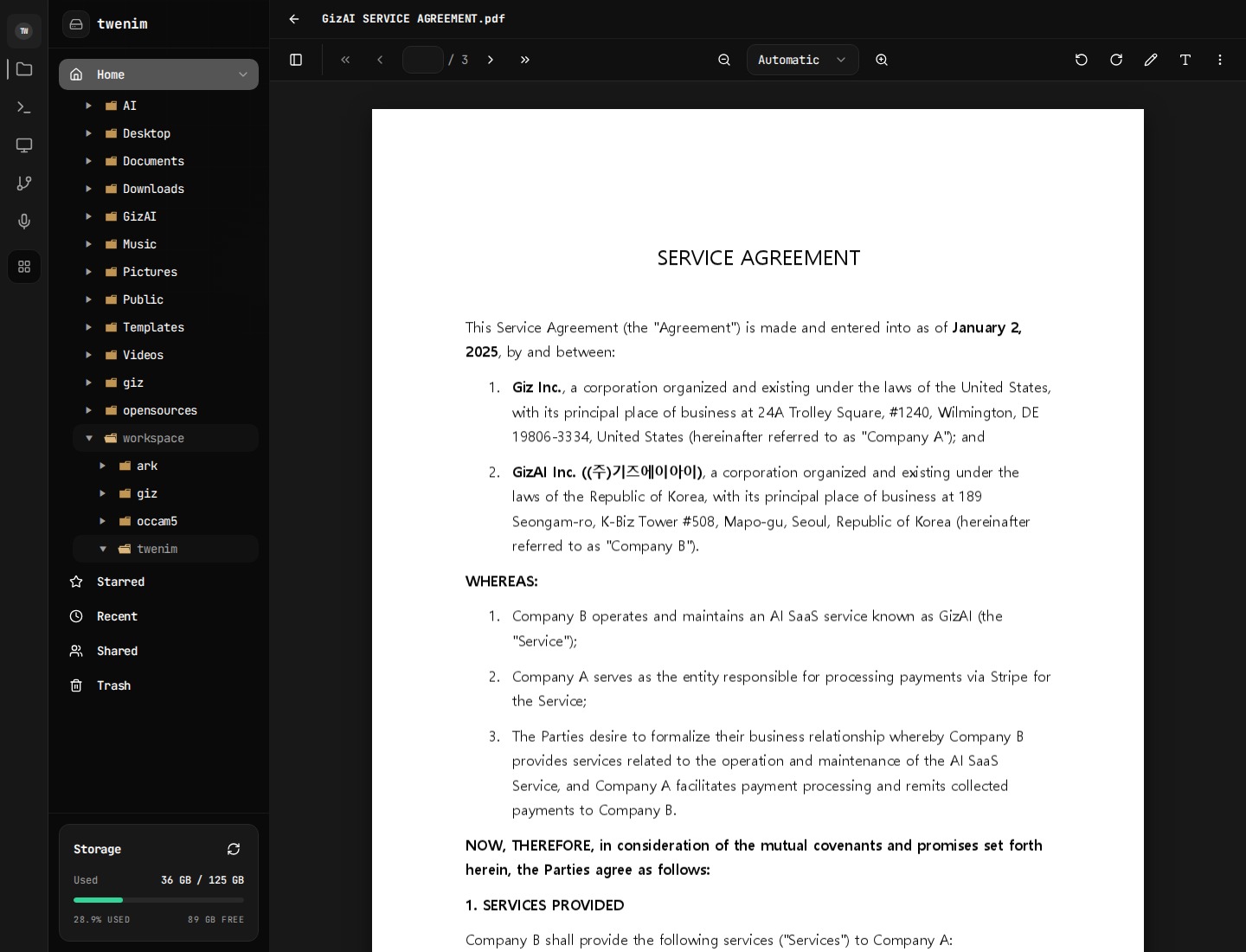
Drive Editing And Reuse

Documents and assets are edited, transformed, and reused in place instead of being exported to another system first.

  • Note, markdown, HTML, PDF, media, and runtime viewer surfaces
  • Upload, archive, extraction, and conversion flows
  • Share and publish paths that can start from stored content

Developer Workflow Built In

Code, review, and manage changes without leaving the computer module.

  • Git panel for changes, branches, and commit context
  • Terminal for package installs, builds, scripts, and deploy flows
  • Drive and desktop for mixed code plus asset workflows

Direct Network Capability

The computer is not boxed into a toy runtime. It can expose real services and direct connectivity.

  • Public IPv6 support where available
  • External HTTP and site exposure flows
  • Custom-domain verification, SSH state, and routed app/site publishing

Machine Lifecycle Control

Provisioning and operating the machine is part of the product surface, not an afterthought.

  • Create, start, stop, recreate, delete, and upgrade computers
  • Container events, billing, and runtime actions from the dashboard
  • Automations and managed runtime controls in the same workspace

Automation And Publishing Layer

Computer can keep work running and expose results outward instead of stopping at an interactive session.

  • Automation runtime exists alongside terminal and app workflows
  • Per-site access control with private/public routing
  • Custom domains, verify flows, and site-level operational controls

Installable Mobile Surface

Computer is designed to keep working from mobile, including install and foreground-stay behaviors.

  • PWA install path from the current computer context
  • Android TWA path and install metadata architecture
  • Wake lock support to keep the workspace foreground-friendly

Workflow View

One machine, many execution paths.

The point is not a long list of isolated features. The point is that intent can move from agent to shell to GUI app to persistent file to exposed site without leaving the same environment.

Chat -> Computer -> Drive

Ask, execute, and persist in one loop instead of handing work off between disconnected tools.

Studio -> Drive -> Computer

Generate assets, save them immediately, then refine them with scripts, desktop apps, or manual file workflows.

Computer -> Site Exposure

Turn a running app or service into a reachable endpoint with exposure, routing, and domain verification.

Desktop -> Mobile Continuity

Pick up the same machine from mobile when you are away from the desktop instead of falling back to a separate lite view.

Drive -> Share Or Restore

Stored work can either move outward through share and publish flows or backward through snapshot restore, without leaving the same environment.

Operating Surface

The missing layer was operations, exposure, and continuity.

Computer does not stop at desktop access. It includes the controls that keep the machine reachable, publishable, automatable, and usable from whatever device you have on hand.

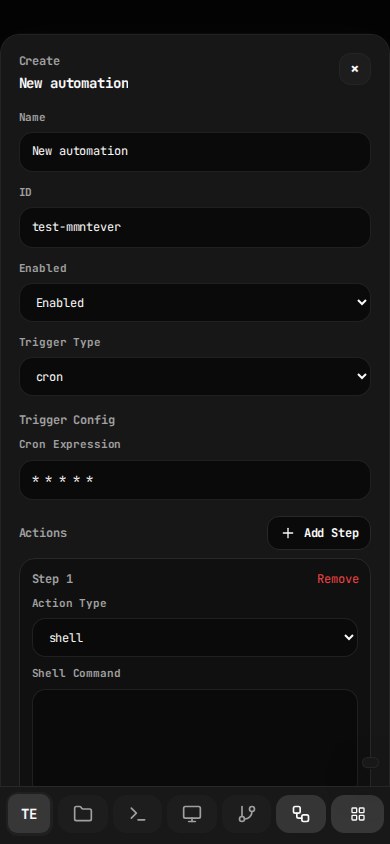
Automation

Automation is part of the surface area, not an afterthought.

The codebase includes a full automation runtime with trigger types, config, crontab, run history, and log viewing. The catalog also already spans automation-class apps and orchestration tools.

  • Trigger types in code: cron, interval, loadavg, file, script, maildir
  • Run now, recent run history, and per-run log inspection
  • Automation category and orchestration apps in the managed catalog
Automation is part of the surface area, not an afterthought.

Network

Direct access is visible and operable from the machine itself.

External SSH status, IPv6-aware networking, site rows, copy actions, logs, pause/resume, and machine switching are all first-class controls.

  • External SSH enable or disable state
  • Endpoint list with active status and operational actions
  • Machine-level control instead of separate infra tooling
Direct access is visible and operable from the machine itself.

Domain

Publishing goes beyond opening a port.

Each site can be configured for routing mode, subdomain, visibility, custom domain, and verification from inside Computer.

  • Proxy or static site type
  • Private token-gated or fully public access
  • Custom domain entry and verification flow
Publishing goes beyond opening a port.

Voice + Mobile

The same machine stays operable across desktop and mobile surfaces.

Voice is a built-in workspace capability, and the remote desktop, tool dock, keyboard controls, and mobile continuity are designed into the same product rather than split into a lite mode.

  • Voice capability is a built-in panel action in the workspace
  • Desktop controls expose keyboard, clipboard, audio, mic, camera, and fullscreen
  • Phone and desktop reopen the same running machine
The same machine stays operable across desktop and mobile surfaces.

Drive Memory

Drive carries the long-term memory of the same environment.

Collection scopes, storage status, file trees, and snapshot controls make Drive the durable layer under Computer instead of a separate cloud bucket.

  • Home, starred, recent, shared, and trash collection scopes
  • Storage visibility tied to the current computer container
  • The same files remain available to desktop, terminal, git, and apps
Drive carries the long-term memory of the same environment.

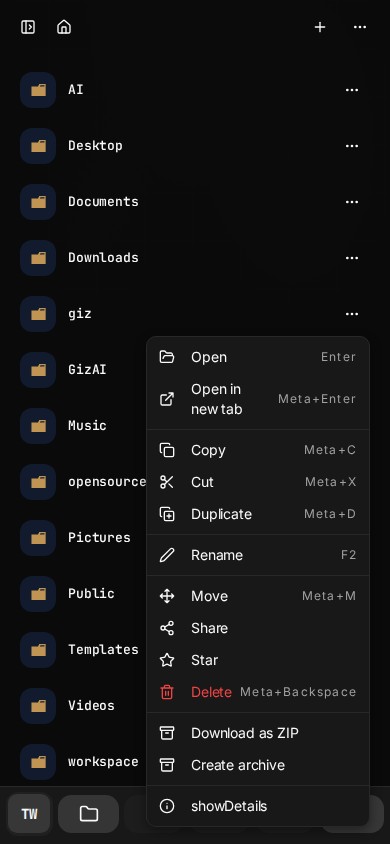
Drive Actions

Stored work stays actionable.

Drive items can be opened, moved, duplicated, archived, zipped, shared, and inspected directly from the file layer.

  • Share, move, duplicate, rename, delete, and ZIP export actions
  • Archive creation and extraction in the same shell
  • A concrete bridge between stored content and execution workflows
Stored work stays actionable.

Snapshots

Time Machine adds restoreable memory to the filesystem.

Automatic policy, manual snapshot creation, nearest-snapshot lookup, and restore planning are visible from the Drive interface itself.

  • Retention policy across hourly, daily, weekly, and monthly buckets
  • Manual point-in-time snapshots for the current computer
  • Restore planning before applying selected-path recovery
Time Machine adds restoreable memory to the filesystem.

Installability

Computer is designed to be installable and mobile-persistent.

The product includes container-aware install UX, PWA/TWA architecture, and wake-lock support so the workspace can behave more like an app than a disposable tab.

  • Install entry lives in the main computer surface
  • Container-specific manifest and install metadata path
  • Wake-lock support for long-running foreground use
Computer is designed to be installable and mobile-persistent.

Why This Product Exists

Ark treats AI as something that needs a body, memory, and execution rights.

The vision for Ark is not another chat frontend. Computer is the environment layer: a persistent machine where AI, files, apps, and user work can keep happening together over time.

CapabilityGiz ComputerCodespacesReplit
Full GUI desktopYesNoNo
Persistent machine stateYesPartialPartial
Mobile-ready control surfaceYesLimitedLimited
Built-in filesystem browserYesPartialPartial
Direct app/site exposureYesNoLimited
AI inside the same environmentYesNoNo

Pricing

Pick the computer size, keep the same product surface.

Pricing scales with machine resources, not a separate stripped-down experience. Paid plans stay on, and paid computers include AI credits equal to the plan price.

2GB

Free
$0/mo
1 cores 2 GB RAM 10 GB NVMe

4GB

$6/mo
2 cores 4 GB RAM 20 GB NVMe

16GB

$15/mo
4 cores 16 GB RAM 75 GB NVMe

32GB

$29/mo
8 cores 32 GB RAM 125 GB NVMe

Computer price and AI budget can move together.

Paid computers include AI credits equal to the plan price. Use them across built-in LLM, image, video, and audio APIs, while CLI tools can still run on your own provider keys.

FAQ

Everything you need to know about Giz Computer.

AI Tools (Optional)

What AI tools are supported?

AI CLI tools like OpenCode and Claude Code are supported. You can install them in minutes and use your own API keys. You can also install Codex CLI, Gemini CLI, Antigravity, or any other AI tools you prefer.

Do I need AI tools to use Giz Computer?

No. Use it like a normal computer. AI tools are optional and only there if you want them.

What are AI Credits for?

AI Credits are for using Giz Computer's built-in AI APIs—LLM chat, image generation, video creation, text-to-speech, and more. They're separate from CLI tools which use your own provider accounts.

Can I use my own API keys?

Yes! All AI coding CLIs (Claude Code, Codex, Gemini CLI, etc.) use your own API keys. This gives you full control over costs, model selection, and usage limits.

Your Computer

What is a cloud computer?

A private Linux computer in the cloud with dedicated CPU, RAM, and NVMe storage. You get full desktop access from your browser.

What specs are available?

5 tiers from 2GB (Free: 1 vCPU, 2GB RAM, 10GB disk) to 32GB (8 vCPU, 32GB RAM, 125GB NVMe). Pick based on your performance needs.

What's installed on my computer?

A clean Linux desktop with common tools. You can install anything else you need.

Can I access my computer from mobile?

Yes! Both the desktop and terminal are mobile-optimized. The desktop supports pinch-to-zoom and touch input. Perfect for on-the-go use.

Billing & Pricing

How does pricing work?

Simple monthly subscription per computer. Paid plans range from $6-$29/mo depending on specs. No hourly billing, no surprise charges. Your computer price becomes your AI Credits budget for our AI API services.

What's included in the free tier?

One free computer with 1 vCPU, 2GB RAM, 10GB disk. Auto-suspends after 30 min idle. No AI Credits included—use your own API keys with pre-installed CLI tools. Great for trying the platform.

Can I change my plan?

Yes, upgrade or downgrade anytime. Changes take effect immediately for upgrades, or at period end for downgrades. Manage subscriptions in your billing portal.

Security & Privacy

Is my data private?

Yes. Each computer runs in complete isolation with its own filesystem and network namespace. Your files never leave your computer unless you explicitly move them.

What about AI API requests?

AI Credits API requests go through our gateway and are billed by token counts. CLI tools (Claude Code, OpenCode, etc.) connect directly to their providers using your API keys.

How is authentication handled?

Email/password or Google OAuth. Passwords are bcrypt-hashed. Sessions use secure HTTP-only cookies.

Desktop & Access

How does the browser desktop work?

Full Linux desktop via browser. TigerVNC server with noVNC client. Supports resolution resizing, clipboard sync, and touch input. Run VS Code, Chrome, or any GUI app.

What's the terminal like?

Full PTY terminal with 100KB scrollback. Supports multiple sessions (up to 10 concurrent). 1-hour idle timeout. Works great on mobile with keyboard detection and viewport optimization.

How does IPv6 work?

Public IPv6 is available in supported regions at no extra cost. It enables direct connectivity without NAT or port forwarding. If your local ISP doesn't support IPv6, use Cloudflare WARP (free) to connect.

Troubleshooting

Why can't I create a computer?

Common reasons: email not verified (check inbox), plan limit reached (upgrade or delete unused computers), or free tier limit (max 1 free computer per account).

My computer shows ERROR status

Stop the computer, wait a moment, then restart. If it persists, the underlying server may have an issue—try creating a new computer in a different region.

How do I backup my computer data?

Use Git to push your code to GitHub/GitLab. For other files, use the file browser to download as ZIP, or rsync/scp from terminal to external storage.

Start Here

Open the machine first. Decide the workflow second.

That is the real value of Giz Computer: one place where desktop apps, shell work, files, agent actions, and network publishing can all happen without context loss.